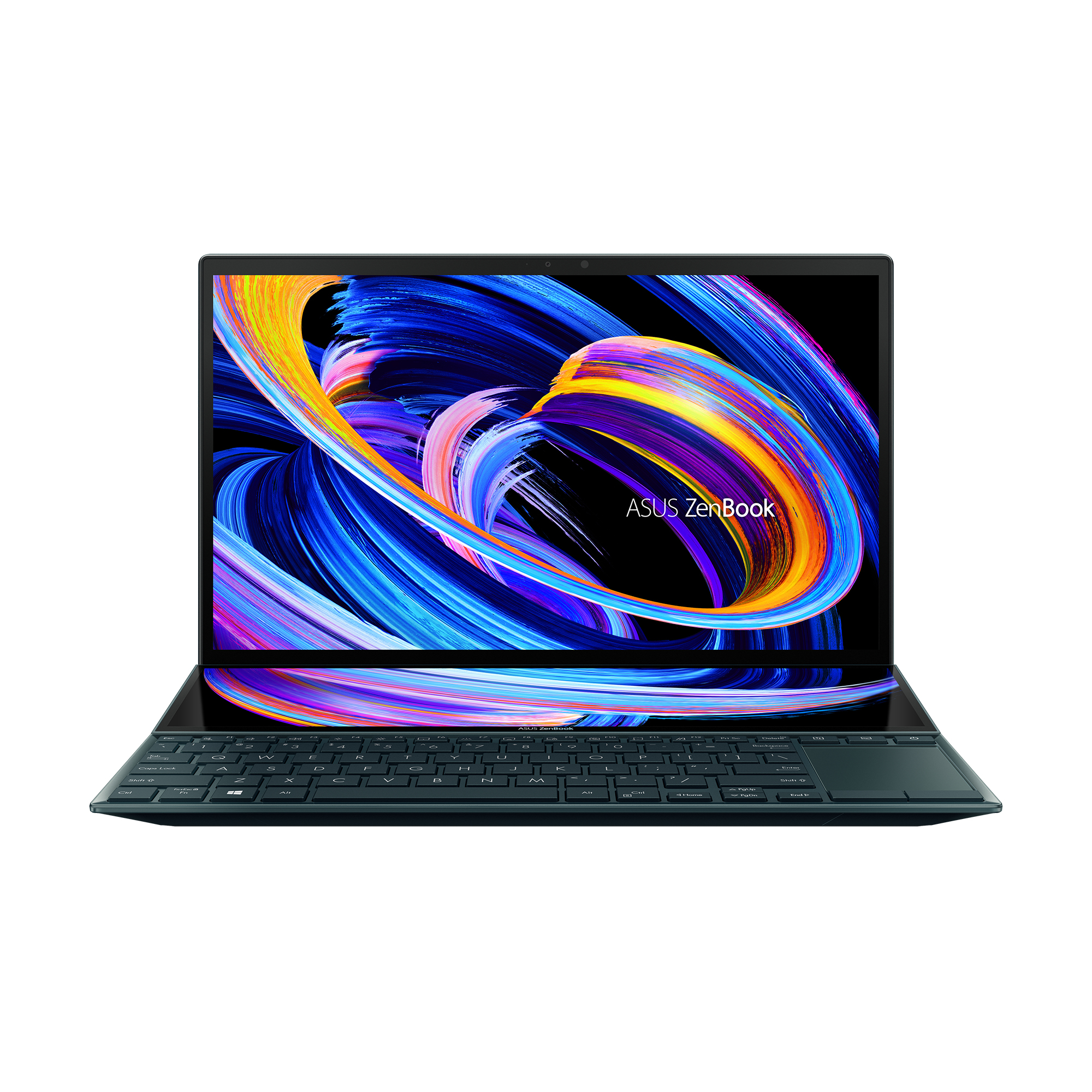
Intel Core Zenbook Duo 14 UX482EGR-HY368X Intel® Core™ i7 i7-1195G7 Laptop 35.6 cm (14″) Touchscreen Full HD 16 GB LPDDR4x-SDRAM 512 GB SSD NVIDIA GeForce MX450 Wi-Fi 6 (802.11ax) Windows 11 Pro Blue
- Screen size
- 14"
- Resolution
- 1920 x 1080
- Processor line
- Intel Core i7
- Clock speed
- 2.9 GHz
- Capacity
- 16 GB
- Storage
- 512 GB
- Cores
- 4
- NVMe
- Y
- Depth
- 222 mm
Overview
The laptop of tomorrow
ZenBook Duo 14 lets you get things done in style: calmly, efficiently, and with zero fuss. It’s your powerful and elegant next-level companion for on-the-go productivity and creativity, featuring the ScreenPad Plus secondary display with a brand-new tilting design that offers effortless ergonomics and seamless workflows. Powered by the latest 11th Gen Intel Core processors, ZenBook Duo 14 brings you all the benefits of tomorrow’s technology, today.
Two seamless displays
ZenBook Duo 14 gives you a superbly immersive viewing experience, with a four-sided frameless NanoEdge display that’s super-bright — up to 400 nits — and has ultraslim bezels for an expansive 93% screen-to-body ratio. It’s also PANTONE Validated for professional-grade color accuracy, and TUV Rheinland-certified for low blue-light emissions, so it’s comfortable to use for long creative sessions.
ZenBook Duo 14 also includes the new tilting ScreenPad Plus, a secondary touchscreen that automatically tilts up to an angle of 7°, which reduces glare and reflections for improved readability. You can enjoy seamless visuals across both displays, with easy multitasking thanks to the built-in ScreenPad Plus-optimized apps that enhance your workflow.
Heavyweight performance
ZenBook Duo 14 is no lightweight when it comes to performance. It harnesses the power of the latest 11th Generation Intel Core processors combined with plenty of fast RAM, plus Intel® Iris® Xe and discrete NVIDIA® graphics. There’s also an ultrafast PCIe® SSD to ensure fast boot times and rapid app loads.
Evolved cooling
ZenBook Duo 14 is engineered with our new Active Aerodynamic System Plus, which uses the ErgoLift hinge mechanism and tilting ScreenPad Plus to increase overall cooling airflow by 49%. This in turn allows an optimum internal temperature to be maintained for maximum performance. Inside, there’s a powerful dual-fan setup with a large-bore heat pipe for efficient heat dissipation. Combined with other innovative measures like liquid-metal thermal compound on the CPU, AAS Plus allows ZenBook Duo 14 to sustain incredible performance, no matter how demanding the workload.
11th Gen Intel® Core™ processor
ZenBook Duo 14 is powered by up to an 11th Generation Intel® Core™ i7 processor. Its multiple cores make light work of your cross-screen workflows using ScreenPad Plus and the main display.
Supercharged graphics
The NVIDIA GeForce MX450 graphics in ZenBook Duo 14 delivers silky-smooth visuals, supercharging your work in photo and video-editing applications. Enjoy a giant leap in performance and power efficiency over prior-generation MX graphics. And if you’re a content creator, you’ll love the effortless on-the-go visual power that ZenBook Duo 14 provides.
Work more productively on the go
We’ve slimmed down the new ZenBook Duo 14 so it’s 3 mm thinner than the previous generation: this is made possible by the tilting ScreenPad Plus design, which reduces the need for internal cooling airflow. Battery life has also been boosted to an amazing 17 hours2 for all-day productivity. The precision-engineered ErgoLift hinge tilts the keyboard by 4.5° for ergonomic, fatigue-free typing.
Experience ultimate productivity
The new tilting ASUS ScreenPad Plus is powered by the new ScreenXpert 2 software, which has been upgraded to make cross-screen multitasking and creativity even easier. Boost your productivity with the built-in apps, and revolutionize your creative workflows with the exclusive new Control Panel app.
Perfect for you
Put tools, references and source files on ScreenPad Plus for the ultimate editing interface.
Scroll through your video timeline on ScreenPad Plus, with plenty of extra room for your pro tools.
Read meeting references and discuss with colleagues on ScreenPad Plus for efficient video conferencing.
Customize your workflow with Control Panel
Control Panel is an exciting new tool that that gives you precise and intuitive control over your creative apps. With Control Panel, you can easily change brush size, change saturation, adjust layer opacity, and much more. Four types of control are available — Dial, Button, Slider, and Scroll — and each work in a different way to help smooth your creative workflow. Control Panel works with Adobe Photoshop, Lightroom Classic, Premiere Pro and After Effects. It’s fully customizable — and there are more compatible apps on the way!
Next-generation ergonomics, for stylus or keyboard
With ZenBook Duo 14 and a second-generation 4096 pressure-level active stylus, such as the new ASUS Pen, you can really let your creativity flow. When ZenBook Duo 14 is placed on the bundled Duo Stand, the new tilting ScreenPad Plus gives you an even more ergonomic and stable platform for writing or drawing. Take notes, sketch out your ideas,
Compatibility
- Requires DDR4 memory — not interchangeable with other generations.
Compatibility data is automatically generated. Always verify critical specs before purchase.
Technical Specifications
Showing 28 key specifications of 97
All values come from this product’s catalog record.- Screen size
- 14"
- Resolution
- 1920 x 1080
- Processor line
- Intel Core i7
- Clock speed
- 2.9 GHz
- Capacity
- 16 GB
- Storage
- 512 GB
- Cores
- 4
- NVMe
- Yes
- Depth
- 222 mm
- Width
- 324 mm
- Weight
- 1570 g
- Display type
- Full HD
- Bluetooth
- Yes
- Panel type
- IPS
- Colour name
- Celestial Blue
- Form factor
- Clamshell
- Touchscreen
- Yes
- Antenna type
- 2x2
- Colour gamut
- 100
- Ethernet LAN
- No
- Front camera
- Yes
- HDMI version
- 1.4
- Product type
- Notebook
- Capacity
- 512 GB
- Height (rear)
- 17.3
- LED backlight
- Yes
- SSD interface
- NVMe,PCI Express 3.0
- Storage media
- SSD
Show all 97 specifications
- Windows Hello
- Yes
- Height (front)
- 16.9
- Numeric keypad
- No
- Colour
- Blue
- Trial software
- 1-month trial for new Microsoft 365 customers. Credit card required.
- Pointing device
- Touchpad
- Cache
- 12 MB
- Model
- i7-1195G7
- Form factor
- M.2
- Wi-Fi standard
- 802.11a,802.11g,Wi-Fi 5 (802.11ac),802.11b,Wi-Fi 4 (802.11n),Wi-Fi 6 (802.11ax)
- AC adapter power
- 65 W
- Battery capacity
- 70 Wh
- Housing material
- Magnesium,Aluminium
- Keyboard backlit
- Yes
- RGB colour space
- sRGB
- Anti-glare screen
- Yes
- Bluetooth version
- 5.0
- Battery technology
- Lithium-Ion (Li-Ion)
- Display brightness
- 400
- Market segment
- Home
- Form factor
- On-board
- Optical drive type
- No
- Top Wi-Fi standard
- Wi-Fi 6 (802.11ax)
- Built-in microphone
- Yes
- HDMI ports
- 1
- Aspect ratio
- 16:9
- Password protection
- Yes
- Total SSDs capacity
- 512
- AC adapter frequency
- 50 - 60
- Front camera HD type
- HD
- Infrared (IR) camera
- Yes
- Memory type
- LPDDR4x-SDRAM
- Generation
- Intel Core i7-11xxx
- Intel® Thunderbolt 4
- Yes
- Speakers manufacturer
- Harman Kardon
- Card reader
- Yes
- Dedicated graphics
- Yes
- Integrated graphics
- Yes
- CPU brand
- Intel
- USB 2.0 ports
- 0
- Compatible memory cards
- MicroSD (TransFlash)
- Max memory
- 16 GB
- Number of battery cells
- 4
- Second display diagonal
- 12.65
- AC adapter input voltage
- 100 - 240
- Combo headphone/mic port
- Yes
- Number of SSDs installed
- 1
- Password protection type
- BIOS,User
- USB Type-C charging port
- Yes
- AC adapter output current
- 3.25 A
- AC adapter output voltage
- 20 V
- Discrete GPU manufacturer
- NVIDIA
- Mobile network connection
- No
- On-board GPU manufacturer
- Intel
- Boost clock
- 5 GHz
- Second display panel type
- IPS
- Second display resolution
- 1920 x 515
- Operating system
- Windows 11 Pro
- USB Power Delivery (USB PD)
- Yes
- Dedicated GPU model
- NVIDIA GeForce MX450
- Integrated GPU model
- Intel Iris Xe Graphics
- Thunderbolt 4 ports quantity
- 2
- VRAM
- 2 GB
- Discrete graphics memory type
- GDDR6
- OS architecture
- 64-bit
- Trusted Platform Module (TPM)
- Yes
- USB Type-C DisplayPort Alternate Mode
- Yes
- USB 3.2 Gen 1 (3.1 Gen 1) Type-A ports quantity
- 1
- USB 3.2 Gen 1 (3.1 Gen 1) Type-C ports quantity
- 0
Market Value History
Price history not started yet
Daily price tracking begins as soon as this product is listed on Amazon US — the trend chart will appear here automatically.
Customer Reviews & Feedback
Based on 11 verified customer reviews on Amazon US.
Review Verification
Hardware Quest synchronizes these ratings daily with Amazon to reflect real buyer experiences, build quality, and long-term reliability.
Sources
Product lifecycle
Status uncertainAvailable catalog signals are incomplete, so current lifecycle status cannot be confirmed.
Similar hardware
LAPTOPSNo close alternatives in this category yet. Browse the category.